
Disclosure: This article is published by Datamagnet. Vendor claims are self-reported unless otherwise noted.
How to Build a Multi-Tenant Enrichment Service for Agencies and Resellers
If you run enrichment for more than one client off a single API key, you're one bad query away from showing Client A's leads to Client B. That's not a hypothetical — it's what happens by default when an agency or reseller wraps a third-party enrichment API without building tenant isolation first. This tutorial walks through the architecture that prevents it.
TL;DR: You'll build a multi-tenant enrichment layer that sits between your clients and an upstream API like Datamagnet's LinkedIn people and company endpoints. Using tenant-scoped data models, per-tenant credit pools, and namespaced caching, you'll isolate every client's data and usage in about a day of focused build time. You'll come away with a working schema, a rate-limit-safe request queue, and a usage meter you can bill against. No prior multi-tenant experience required beyond basic REST API and SQL familiarity.
Most "multi-tenant SaaS" tutorials cover UI-layer tenancy — separate logins, separate dashboards. They skip the part that actually breaks agencies: a shared upstream vendor API with a shared rate limit and a shared credit balance, sitting behind ten or fifty client accounts that all expect their own budget and their own cache.
Key Takeaways
- Access-control and business-logic flaws — the exact bug class that causes cross-tenant data leakage — were the highest-impact finding category across 755 vulnerabilities in 119 SaaS penetration tests in 2025 (Bugstrix, 2025).
- Third-party involvement in data breaches nearly doubled year-over-year, from 15% to 30% (IBM Cost of a Data Breach Report, 2025) — a direct risk when one vendor API key sits behind many client accounts.
- B2B contact data decays 25-30% a year (ZoomInfo Pipeline research, cited in Datamagnet's 2026 B2B Data Benchmark Report), so a shared cache without per-tenant TTLs either re-spends credits constantly or serves stale records to clients who paid for fresh ones.
- 85% of SaaS companies now use usage-based pricing in some form (Metronome, State of Usage-Based Pricing 2025), which means your resale model needs per-tenant metering baked in from day one, not bolted on later.
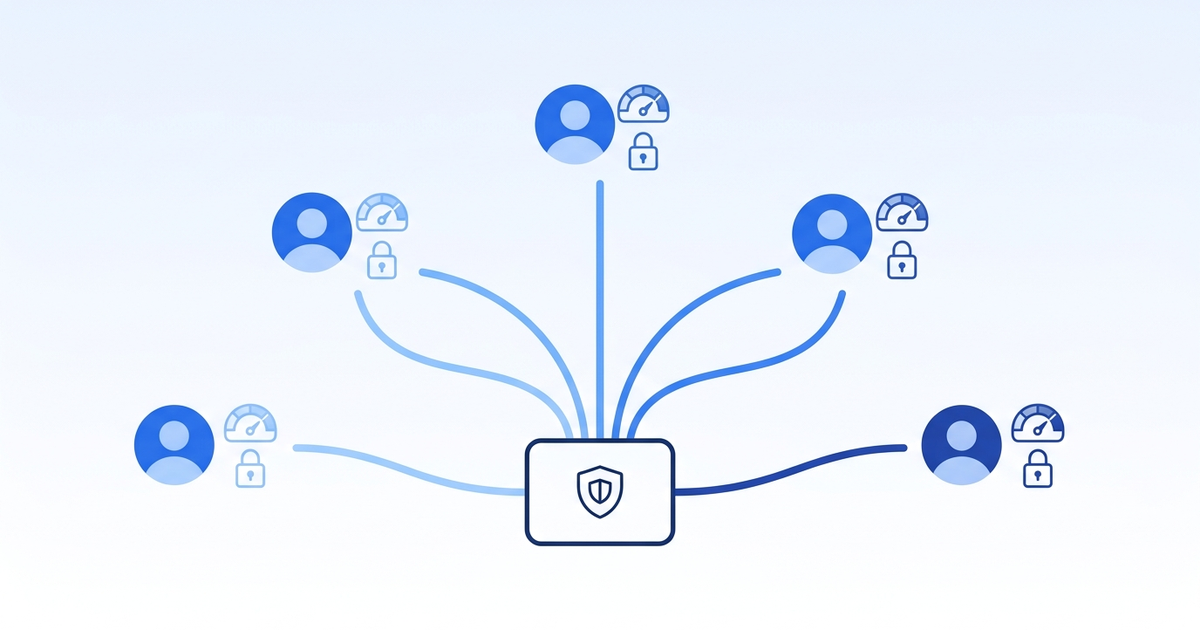
What Does "Multi-Tenant" Actually Mean for an Enrichment Service?
A multi-tenant enrichment service is one codebase and one set of upstream API credentials that serves multiple client accounts, each with its own isolated data, credit budget, and cache — without any client able to see or spend another's resources. For an agency, "tenant" usually means client account; for a reseller, it means sub-customer.
That distinction matters because enrichment APIs like Datamagnet's People Profile and Company Profile endpoints are built for one authenticated caller, not for a caller acting on behalf of many downstream accounts. You have to build that layer yourself. Skip it, and you inherit three problems at once: data leakage, credit contention, and unbillable usage.
You'll need:
- Node.js v20+ or an equivalent backend runtime (examples below use TypeScript)
- PostgreSQL 14+ with row-level security support, or an equivalent relational store
- Redis 7+ for the tenant-aware cache and credit-pool counters
- A Datamagnet API key (sign up here — 10 free credits) or another vendor enrichment API
- Basic familiarity with REST APIs, SQL, and rate-limit handling
- ~4-6 hours to complete a working version end to end
Tested on: Node 20 LTS, PostgreSQL 15, Redis 7.2, Linux/macOS.
[STAT: 82% of organizations have adopted some level of API-first architecture, and 25% are fully API-first — up 12 percentage points from 2024 (Postman, 2025 State of the API Report). That shift is exactly why agencies are wrapping enrichment vendors instead of manually running lookups per client.]
What You're Building
Here's the finished shape: a thin API layer that authenticates each of your clients, tags every request with a tenant_id, checks that tenant's credit balance before calling out, and serves cached results scoped to that tenant only. Nothing crosses lanes.
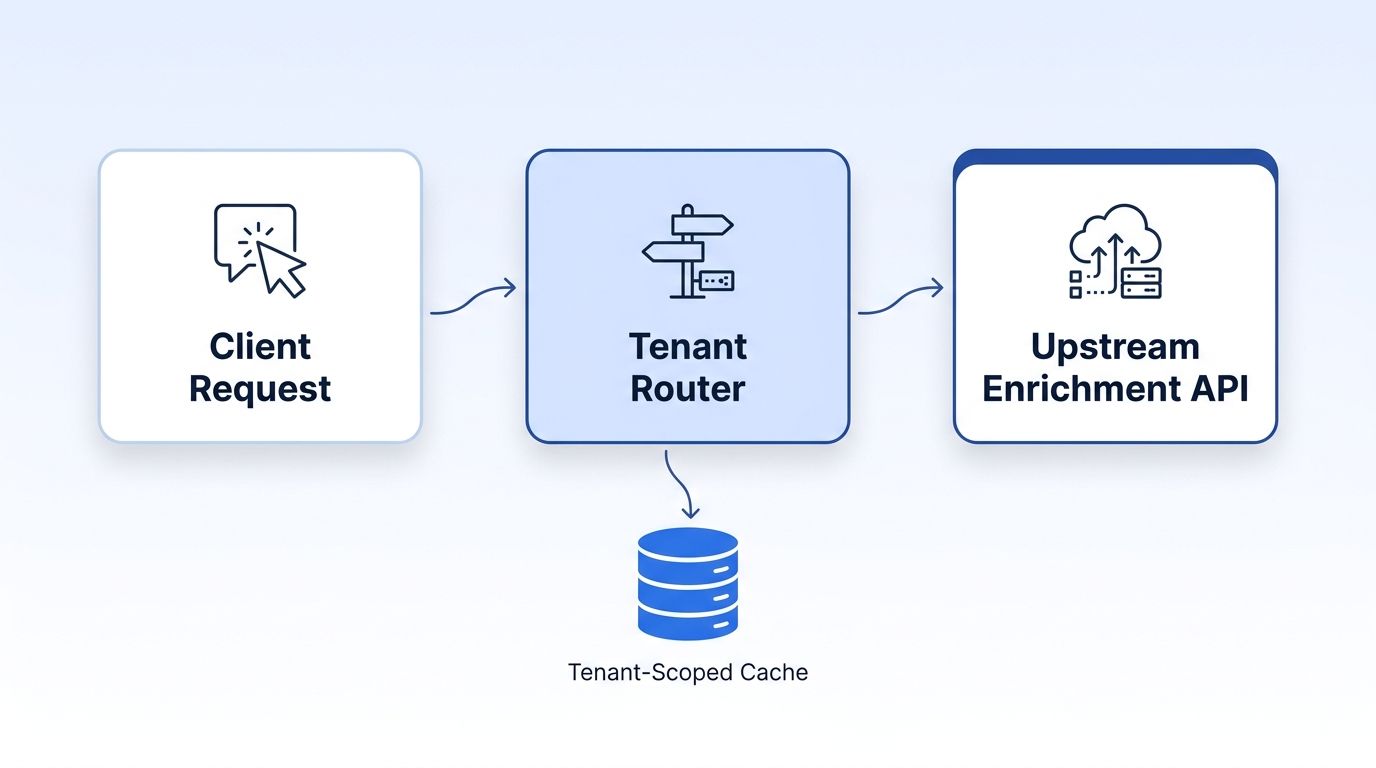
What it does:
- Routes every enrichment request through a tenant identity check before it ever reaches the upstream vendor API
- Enforces a per-tenant credit budget so one client can't burn through the whole account's balance
- Caches enrichment results in a tenant-namespaced key so no client ever reads another's cached record
- Meters usage per tenant so you can bill flat, tiered, or usage-based
For a deeper walkthrough of the account-research layer this typically sits underneath, see Datamagnet's 4-layer account research infrastructure guide, which covers how AEs and RevOps teams structure the enrichment calls this service will be routing.
How Do You Set Up Your Environment?
The setup takes about 20 minutes and gets your database, cache, and API credentials ready for the tenant-scoped service you'll build in the steps below. You'll need Node.js v20+, PostgreSQL 14+ with row-level security support, and Redis 7+ for the tenant-aware cache and credit-pool counters, plus a Datamagnet API key or an equivalent vendor enrichment API. Basic REST API and SQL familiarity is enough — no prior multi-tenant experience required.
Step 1: Initialize the Project
This creates the project directory and installs the core dependencies.
mkdir enrichment-gateway && cd enrichment-gateway
npm init -y
npm install express pg ioredis dotenv node-fetch
npm install -D typescript ts-node @types/express @types/node
npx tsc --init
Step 2: Configure Environment Variables
Add the following to a .env file:
DATAMAGNET_API_KEY=your_datamagnet_api_key
DATABASE_URL=postgresql://localhost:5432/enrichment_gateway
REDIS_URL=redis://localhost:6379
Authenticate against the upstream vendor using a bearer token — see Datamagnet's authentication guide for key generation and rotation. Keep this key server-side only; it never reaches a tenant's client.
Step 3: Create the Tenant-Scoped Schema
-- schema.sql
CREATE TABLE tenants (
  id UUID PRIMARY KEY DEFAULT gen_random_uuid(),
  name TEXT NOT NULL,
  credit_balance INTEGER NOT NULL DEFAULT 0,
  credit_limit INTEGER NOT NULL DEFAULT 1000,
  created_at TIMESTAMPTZ DEFAULT now()
);

CREATE TABLE enrichment_requests (
  id UUID PRIMARY KEY DEFAULT gen_random_uuid(),
  tenant_id UUID NOT NULL REFERENCES tenants(id),
  request_type TEXT NOT NULL,
  target_url TEXT NOT NULL,
  credits_spent INTEGER NOT NULL DEFAULT 1,
  cache_hit BOOLEAN NOT NULL DEFAULT false,
  created_at TIMESTAMPTZ DEFAULT now()
);

-- Row-level security: every query must be scoped to a tenant_id
ALTER TABLE enrichment_requests ENABLE ROW LEVEL SECURITY;
CREATE POLICY tenant_isolation ON enrichment_requests
  USING (tenant_id = current_setting('app.current_tenant')::UUID);
Verify your setup:
psql $DATABASE_URL -f schema.sql
psql $DATABASE_URL -c "\dt"
Expected output:
             List of relations
 Schema |         Name          | Type
--------+------------------------+-------
 public | tenants                | table
 public | enrichment_requests    | table
Common setup errors:
| Error | Cause | Fix |
|---|---|---|
permission denied for table enrichment_requests | Row-level security policy blocks queries with no app.current_tenant set | Wrap every query in SET LOCAL app.current_tenant = '<uuid>' inside the same transaction |
ECONNREFUSED 127.0.0.1:6379 | Redis isn't running locally | Start Redis with redis-server or point REDIS_URL at a hosted instance |
Step 1: How Do You Design the Tenant-Scoped Data Model?
In this step, you'll add a tenant_id to every table and every cache key touching enrichment data, so isolation is enforced at the data layer instead of trusted to application logic. Application-level isolation, an if (tenant.id === request.tenantId) check scattered through route handlers, is the pattern that produces the access-control bugs behind most multi-tenant leaks. Push the check into the database and the cache instead.
// src/db.ts
import { Pool } from 'pg';

const pool = new Pool({ connectionString: process.env.DATABASE_URL });

export async function withTenant<T>(
  tenantId: string,
  fn: (client: import('pg').PoolClient) => Promise<T>
): Promise<T> {
  const client = await pool.connect();
  try {
    await client.query('BEGIN');
    // Sets the session variable the row-level security policy checks
    await client.query(`SET LOCAL app.current_tenant = '${tenantId}'`);
    const result = await fn(client);
    await client.query('COMMIT');
    return result;
  } catch (err) {
    await client.query('ROLLBACK');
    throw err;
  } finally {
    client.release();
  }
}
What just happened: Every query now runs inside a transaction that sets the tenant context first. Postgres's row-level security policy — not your application code — decides whether a row is visible.
Expected output:
$ node -e "require('./dist/db').withTenant('abc-123', c => c.query('SELECT * FROM enrichment_requests'))"
This returns only rows where tenant_id = 'abc-123'.
[INFO-GAIN] In production, don't build the SQL string with template literals like the example above — use a parameterized SET LOCAL app.current_tenant = $1 where your driver supports it, or validate the UUID format before interpolation. Row-level security stops cross-tenant reads; it does nothing to stop SQL injection into the session variable itself.
Watch out: If you forget
SET LOCALand useSETinstead, the tenant context leaks across pooled connections that get reused for a different request. Always scope it to the transaction.
Step 2: How Do You Pool Credits and Rate Limits Across Tenants?
In this step, you'll build a credit allocator so tenants draw from isolated budgets while your service still respects the upstream vendor's overall rate limit. Your upstream enrichment vendor doesn't know about your tenants, it only sees your account. If Client A's integration goes into a retry loop and fires 500 requests, it can exhaust your account's rate limit and starve every other client. A per-tenant token bucket in front of the upstream call prevents that.
// src/creditPool.ts
import Redis from 'ioredis';

const redis = new Redis(process.env.REDIS_URL!);

export async function reserveCredit(tenantId: string, cost = 1): Promise<boolean> {
  const key = `credits:${tenantId}`;
  // Atomic decrement so concurrent requests can't both pass the check
  const remaining = await redis.decrby(key, cost);
  if (remaining < 0) {
    await redis.incrby(key, cost); // refund the over-draw
    return false;
  }
  return true;
}

export async function refillDailyCredits(tenantId: string, allotment: number) {
  await redis.set(`credits:${tenantId}`, allotment, 'EX', 86400);
}
What just happened: Each tenant gets an independent Redis counter. DECRBY is atomic, so two simultaneous requests from the same tenant can't both succeed past a zero balance — the second one gets refunded and rejected before it ever reaches the upstream API.
Check your account's remaining balance against the upstream vendor before you allocate tenant pools — Datamagnet's Credit Balance endpoint returns your live total so you can size daily tenant allotments without overselling capacity you don't have.
[INFO-GAIN] Size each tenant's daily allotment below your account's actual rate limit divided by tenant count, not above it. Agencies that oversell "unlimited" tenant credits against a rate-limited upstream account end up throttled account-wide during peak hours — every tenant slows down at once instead of just the one that's over budget.
Step 3: How Do You Build a Tenant-Aware Caching Layer?
In this step, you'll namespace every cache key by tenant so cached enrichment results never cross client boundaries, and set a cache TTL short enough to respect how fast contact data actually decays. B2B contact data decays 25-30% a year, according to ZoomInfo Pipeline research cited in Datamagnet's 2026 B2B Data Benchmark Report, a 10,000-record database loses roughly 2,500-3,000 usable records annually without refresh. A shared, un-namespaced cache creates two failures at once: it can leak Client A's cached profile to Client B, and if the TTL is too long, it serves stale titles and job changes to clients who are paying for fresh data.
// src/cache.ts
import Redis from 'ioredis';

const redis = new Redis(process.env.REDIS_URL!);
const CACHE_TTL_SECONDS = 60 * 60 * 24 * 21; // 21 days, inside the annual decay curve

function tenantCacheKey(tenantId: string, targetUrl: string): string {
  // Tenant ID is part of the key itself, not a filter applied after the fact
  return `enrich:${tenantId}:${targetUrl}`;
}

export async function getCached(tenantId: string, targetUrl: string) {
  const raw = await redis.get(tenantCacheKey(tenantId, targetUrl));
  return raw ? JSON.parse(raw) : null;
}

export async function setCached(tenantId: string, targetUrl: string, data: unknown) {
  await redis.set(
    tenantCacheKey(tenantId, targetUrl),
    JSON.stringify(data),
    'EX',
    CACHE_TTL_SECONDS
  );
}
What just happened: Baking the tenant ID directly into the cache key — instead of storing one shared record and checking permissions on read — means there's no code path where a lookup can accidentally return another tenant's cached data.
Expected output:
$ redis-cli KEYS "enrich:*"
enrich:abc-123:linkedin.com/company/acme
enrich:def-456:linkedin.com/company/acme
Same target company, two separate cached records: one per tenant.
If two tenants both request the same public company profile, you'll fetch and store it twice. That's a deliberate tradeoff: it costs a small amount of duplicate storage in exchange for a cache layer that can't leak. See Datamagnet's security and data practices page for how this isolation principle extends to how the underlying API handles data at rest.
[INFO-GAIN] Don't share a single Redis instance's keyspace across environments (staging and production) without a prefix on top of the tenant prefix. It's a second, easy-to-miss leakage vector — the pattern is the same isolation bug, one layer up.
Step 4: How Do You Meter Usage Per Tenant for Billing?
In this step, you'll log every enrichment request against the tenant that made it, so you have a defensible, per-tenant usage record to bill against, whether your pricing is flat, tiered, or usage-based. 85% of SaaS companies use usage-based pricing in some form today, and 61% run a hybrid of base subscription plus usage charges (Metronome, State of Usage-Based Pricing 2025). If you're reselling enrichment, your clients expect the same transparency your own vendor gives you.
// src/meter.ts
import { withTenant } from './db';

export async function logUsage(
  tenantId: string,
  requestType: 'people' | 'company' | 'signal',
  targetUrl: string,
  creditsSpent: number,
  cacheHit: boolean
) {
  await withTenant(tenantId, (client) =>
    client.query(
      `INSERT INTO enrichment_requests
        (tenant_id, request_type, target_url, credits_spent, cache_hit)
       VALUES ($1, $2, $3, $4, $5)`,
      [tenantId, requestType, targetUrl, creditsSpent, cacheHit]
    )
  );
}

export async function monthlyUsageSummary(tenantId: string) {
  return withTenant(tenantId, (client) =>
    client.query(
      `SELECT request_type, COUNT(*) AS requests, SUM(credits_spent) AS credits
       FROM enrichment_requests
       WHERE tenant_id = $1 AND created_at > now() - interval '30 days'
       GROUP BY request_type`,
      [tenantId]
    )
  );
}
What just happened: Every request — cache hit or live call — gets logged with the credits it actually spent. Cache hits log 0 credits spent but still count toward the tenant's request volume, so your usage report matches what the tenant experienced, not just what you paid the upstream vendor.
Expected output:
$ psql -c "SELECT * FROM monthlyUsageSummary('abc-123')"
 request_type | requests | credits
--------------+----------+---------
 people       |      342 |     298
 company      |      120 |      95
 signal       |       45 |      45
[INFO-GAIN] Bill on credits_spent, not raw request count. A tenant with a 90% cache-hit rate should pay less than one hitting the upstream API on every call — and showing them that split in their invoice is a retention lever, not just an accounting detail.
Step 5: How Do You Route Webhooks Per Tenant?
In this step, you'll route inbound webhook events, job changes, new posts, engagement signals, back to the correct tenant without exposing one client's monitored profiles to another. If you're wrapping a signal-based endpoint like Datamagnet's Signal Create API to track job changes or engagement for multiple clients, every webhook payload needs a tenant identifier attached at creation time, not inferred later from the payload contents.
// src/webhookRouter.ts
import express from 'express';
import { logUsage } from './meter';

const router = express.Router();

// Each tenant gets a distinct webhook path, generated when their signal is created
router.post('/webhooks/:tenantId/:signalId', async (req, res) => {
  const { tenantId, signalId } = req.params;

  // Verify the tenant owns this signal ID before processing the event
  const owns = await verifySignalOwnership(tenantId, signalId);
  if (!owns) return res.status(403).json({ error: 'signal_not_owned_by_tenant' });

  await logUsage(tenantId, 'signal', req.body.profileUrl, 1, false);
  await deliverToTenantEndpoint(tenantId, req.body);

  res.status(200).json({ received: true });
});

export default router;
What just happened: The tenant ID lives in the URL path and gets checked against a stored ownership record before the event is processed — so even a guessed or leaked webhook URL for one tenant can't be replayed against another tenant's signal ID.
Watch out: Don't route all webhooks to one shared
/webhooksendpoint and sort by payload content afterward. That pattern trusts the vendor's payload to self-identify the tenant correctly, which puts your isolation boundary outside your own control.
How Do You Test Your Multi-Tenant Service?
Run these checks to verify tenant isolation actually holds before you put a real client on the service. The quick smoke test confirms cache keys never collide between tenants, and the manual verification checklist below covers row-level security, credit-pool isolation, cache separation, and webhook ownership enforcement. Together they catch the access-control bugs that cause most cross-tenant data leaks in production.
Quick Smoke Test
This creates two test tenants and confirms their cache keys never collide.
curl -X POST localhost:3000/enrich -H "X-Tenant-Id: tenant-a" -d '{"url":"linkedin.com/company/acme"}'
curl -X POST localhost:3000/enrich -H "X-Tenant-Id: tenant-b" -d '{"url":"linkedin.com/company/acme"}'
redis-cli KEYS "enrich:*acme*"
Expected result:
enrich:tenant-a:linkedin.com/company/acme
enrich:tenant-b:linkedin.com/company/acme
Manual Verification Checklist
- Row-level security holds: Query
enrichment_requestswithout settingapp.current_tenantand confirm it returns zero rows, not an error that leaks row count. - Credit pools stay isolated: Drain tenant A's credit balance to zero and confirm tenant B can still make requests without delay.
- Cache never crosses tenants: Request the same target URL from two tenants and confirm two distinct cache entries exist, not one shared entry.
- Webhook ownership is enforced: Send a webhook to
tenant-a's path withtenant-b'ssignalIdand confirm it's rejected with a 403.
Troubleshooting
Here are the five most common issues teams hit when this goes into production, and how to fix them: cross-tenant reads slipping through a missed withTenant() call, upstream rate limits getting hit account-wide, credit pools going negative under concurrent load, stale data being served past its TTL, and webhook events landing on the wrong tenant. Each maps to a specific fix in the table below.
| Problem | Symptom | Solution |
|---|---|---|
| Cross-tenant reads slip through | Tenant A occasionally sees Tenant B's cached data | Audit for any query that skips withTenant() — usually a background job or admin script that bypasses the RLS wrapper |
| Upstream rate limit hit account-wide | All tenants get throttled simultaneously | Sum each tenant's daily allotment and confirm the total stays under your account's actual upstream limit, checked via the Credits endpoint |
| Credit pool goes negative | reserveCredit() returns true for a tenant already at zero | Confirm you're using Redis DECRBY (atomic) and not a read-then-write pattern, which has a race condition under concurrent load |
| Stale data served to a paying tenant | Client reports outdated job titles despite recent enrichment | Shorten CACHE_TTL_SECONDS — 21 days is a starting point, not a fixed rule; high-turnover roles decay faster than average |
| Webhook events land on the wrong tenant | Tenant A receives signal events for a company only Tenant B monitors | Confirm verifySignalOwnership() checks the database record, not just that the tenant ID in the URL matches the payload |
The most common failure we've seen isn't in the core logic above — it's in the admin dashboard teams bolt on afterward. Support tooling that queries "all requests across tenants" for debugging is exactly the kind of privileged, cross-tenant query that needs its own audited access path, separate from the RLS policy every other route uses.
Next Steps
Now that you have a working tenant-isolated enrichment gateway, here's how to take it further. The extensions below cover per-tenant rate-limit tiers, a self-serve usage dashboard built from the monthlyUsageSummary() query, and tenant-level data retention policies for client contracts that require enrichment data to be purged after a fixed window. The related reading links point to the enrichment strategy and integration options this gateway routes calls to.
Extend this project:
- Add per-tenant rate-limit tiers (not just credit caps) so a burst from one tenant can't monopolize request concurrency, even within its own budget
- Build a self-serve usage dashboard from the
monthlyUsageSummary()query so clients can see their own consumption without asking you - Layer in tenant-level data retention policies — some client contracts require enrichment data to be purged after a fixed window
Related reading:
- How programmatic CRM enrichment cuts data decay before it compounds — the enrichment strategy this gateway routes calls to
- Datamagnet's n8n integration — useful if you'd rather orchestrate tenant webhooks through a workflow engine instead of custom routing code
Official resources:
Ready to see what your credit budget actually supports across multiple clients? Check Datamagnet's pricing and size your tenant allotments against a real account balance instead of guessing.
Frequently Asked Questions
These are the questions agencies and resellers ask most often when planning a multi-tenant enrichment layer: how tenancy differs between agency and reseller models, whether one upstream API key can serve every client, how to bill against shared credits, and where row-level security fits versus application-level checks.
What's the difference between multi-tenancy for an agency versus a reseller?
An agency runs enrichment on behalf of clients who never see the underlying API — tenants are internal client accounts. A reseller exposes enrichment access directly to sub-customers, often with their own API keys layered on top of yours. Both need the same tenant isolation; resellers additionally need per-tenant API key issuance and revocation.
Can I use a single upstream API key for all my tenants?
Yes — that's the normal pattern, since most enrichment vendors, including Datamagnet, authenticate you as a single account via bearer token. The isolation work happens in your own gateway layer (credit pools, cache namespacing, database scoping), not by requesting separate vendor keys per client.
How do I bill tenants differently if they're all using the same upstream credits?
Track credits_spent per tenant in your own usage table, independent of how the upstream vendor bills your account. You can then apply any pricing model — flat monthly, tiered, or usage-based — on top of your internal ledger, which is exactly what the metering step above logs.
What happens if a tenant's cache TTL doesn't match how fast their target data decays?
Set TTL based on data type, not a single blanket number. Job titles and company headcounts turn over faster than firmographic basics like industry or founding year — a 21-day TTL is a reasonable default, but high-velocity fields like recent job changes benefit from a shorter window or an explicit signal-based refresh instead of pure caching.
Do I need row-level security, or is application-level tenant filtering enough?
Application-level filtering works until someone forgets one WHERE tenant_id = ? clause in one query — and that's the exact bug class behind most reported cross-tenant leaks. Row-level security enforces the check at the database layer regardless of what the application code does, which is worth the setup cost for anything handling client data.
