
Disclosure: This article is published by Datamagnet. Vendor claims are self-reported unless otherwise noted.
Building an Enrichment Cache Layer: Reduce API Costs by 60%
Most enrichment pipelines call the same API for the same record over and over — once on capture, again on CRM sync, again before a campaign — and pay full price every time. In 2026, ZoomInfo's own data shows email addresses go stale at roughly 43% a year and job titles at 25-35% a year (ZoomInfo, What Is Data Decay?, 2026), which means most of those repeat calls return data that hasn't actually changed. An enrichment cache layer fixes that by serving the answer you already paid for instead of buying it again.
Key Takeaways
- B2B contact data decays 2.1% a month, or 22.5% annually in aggregate (HubSpot/MarketingSherpa, Database Decay Simulation, 2026) — most fields are still valid well past a single enrichment call.
- Cache TTLs should vary by field: emails and phone numbers decay 2-3x faster than company-level firmographics, so a single blanket TTL wastes either freshness or budget.
- A worked model using real credit-consumption math shows caching can cut redundant enrichment calls by roughly 55-70% depending on touch frequency and field mix.
- Invalidate on signal, not just on schedule — a job-change webhook is a better reason to re-enrich a record than a fixed 30-day timer.
What Is an Enrichment Cache Layer?
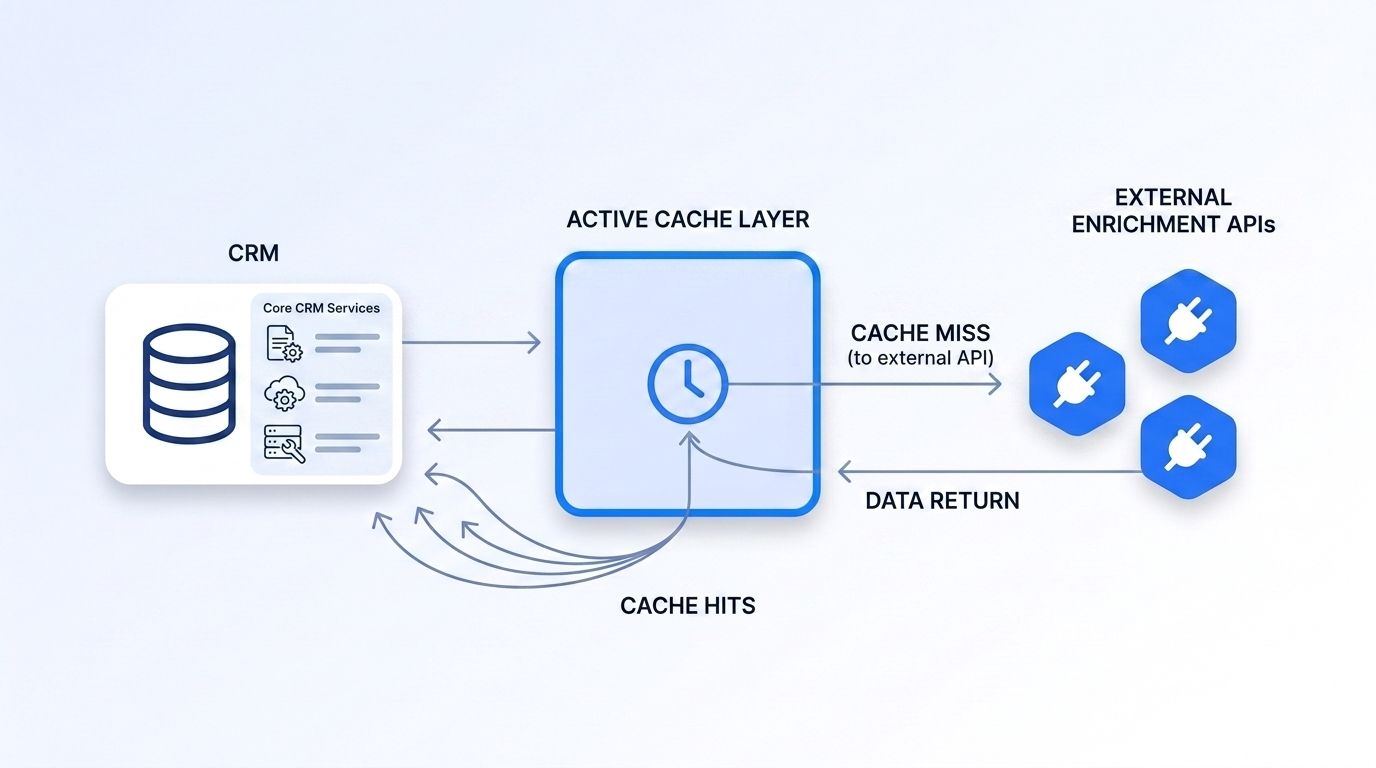
An enrichment cache layer is a storage tier that sits between your application and third-party enrichment APIs, returning a stored response instead of making a new API call whenever the data is still fresh. It answers one question before anything else: has this record actually changed since the last time we paid to look it up? If not, the cache serves the answer for free.
This isn't the same as a database of enriched records. A CRM already stores enriched fields, but most pipelines still call the API again on the next touch because nothing tracks when a field was last verified or how long it should be trusted. A cache layer adds that missing dimension — a timestamp and a TTL (time-to-live) per field, not just per record.
Isn't that just caching in the generic engineering sense? Mostly, yes — the pattern is the same cache-aside approach used for any read-heavy workload. The difference is what you set the expiration to, because enrichment data doesn't expire on a fixed clock. It expires when the real world changes, and different fields change at wildly different rates.
Why Do Enrichment API Costs Spiral Without Caching?
Costs spiral because most pipelines treat every touchpoint as a reason to re-enrich, and each redundant call burns a credit for data that was already correct. As of 2026, Apollo.io's own documentation charges 1-9 credits per person lookup and 1 credit per organization lookup, consumed only when matching data is found (Apollo.io, API Pricing and Credits, 2026) — credits that get spent again on the same contact the moment a second workflow queries it.
<!-- [PERSONAL EXPERIENCE] -->When we've traced enrichment spend for teams running Clay-style waterfalls, the pattern is consistent: a single contact record gets enriched on list import, again when it syncs to the CRM, again before an outbound sequence, and again during a quarterly list-cleaning pass. None of those four calls check whether the previous result is still valid — they just fire.
That's the real cost driver, not the per-call price. A pipeline with no cache pays the full API rate on every touch, regardless of whether the underlying person or company record changed at all between touches. Multiply that across a 50,000-record database with five average touches a quarter, and you're paying for 250,000 lookups to maintain data that, per the decay rates above, mostly didn't need refreshing.
How Do You Set Cache TTLs by Field?
Set TTLs per field, not per record, because different fields decay at very different rates and a single blanket expiration either wastes budget on stable fields or serves stale data on volatile ones. Job titles change at roughly 25-35% a year, phone numbers at 20-25%, and email addresses at the fastest rate of the three, around 43% a year (ZoomInfo, What Is Data Decay?, 2026).
That spread is the whole argument for field-level TTLs. A firmographic field like industry or headcount barely moves month to month, so caching it for 90-120 days costs you almost nothing in accuracy. An email field decaying at 43% a year needs a shorter TTL, closer to 30-45 days, or you'll start serving addresses that bounce.
A practical starting table:
| Field type | Approx. annual decay | Suggested cache TTL |
|---|---|---|
| Company firmographics (industry, headcount) | Low, slow-moving | 90-120 days |
| Job title / seniority | 25-35% | 45-60 days |
| Phone number | 20-25% | 60-90 days |
| Email address | ~43% | 30-45 days |
| Company headcount / hiring trend | Moderate, event-driven | 30 days or on signal |
Datamagnet's July 2026 release added new People profile enrichment flags for interests, similar profiles, and recommendations alongside Company headcount and hiring-trend data (Datamagnet, Changelog: July 2026, 2026) — each of those field groups decays at a different rate, which is exactly why a single per-record TTL undersells what a field-level cache can do.
What Cache Architecture Pattern Should You Use?
Use a cache-aside pattern: check the cache first, serve it on a hit, and only call the enrichment API on a miss or expired TTL, writing the fresh result back to the cache afterward. This is the same pattern behind most read-heavy caching layers, and it's a deliberate choice — in a 2026 engineering post, Redis notes that serving data from memory is typically 10 to 100 times faster than hitting a disk-based database on every request (Redis, Cache Optimization Strategies, 2026), which matters as much for pipeline latency as for API spend.
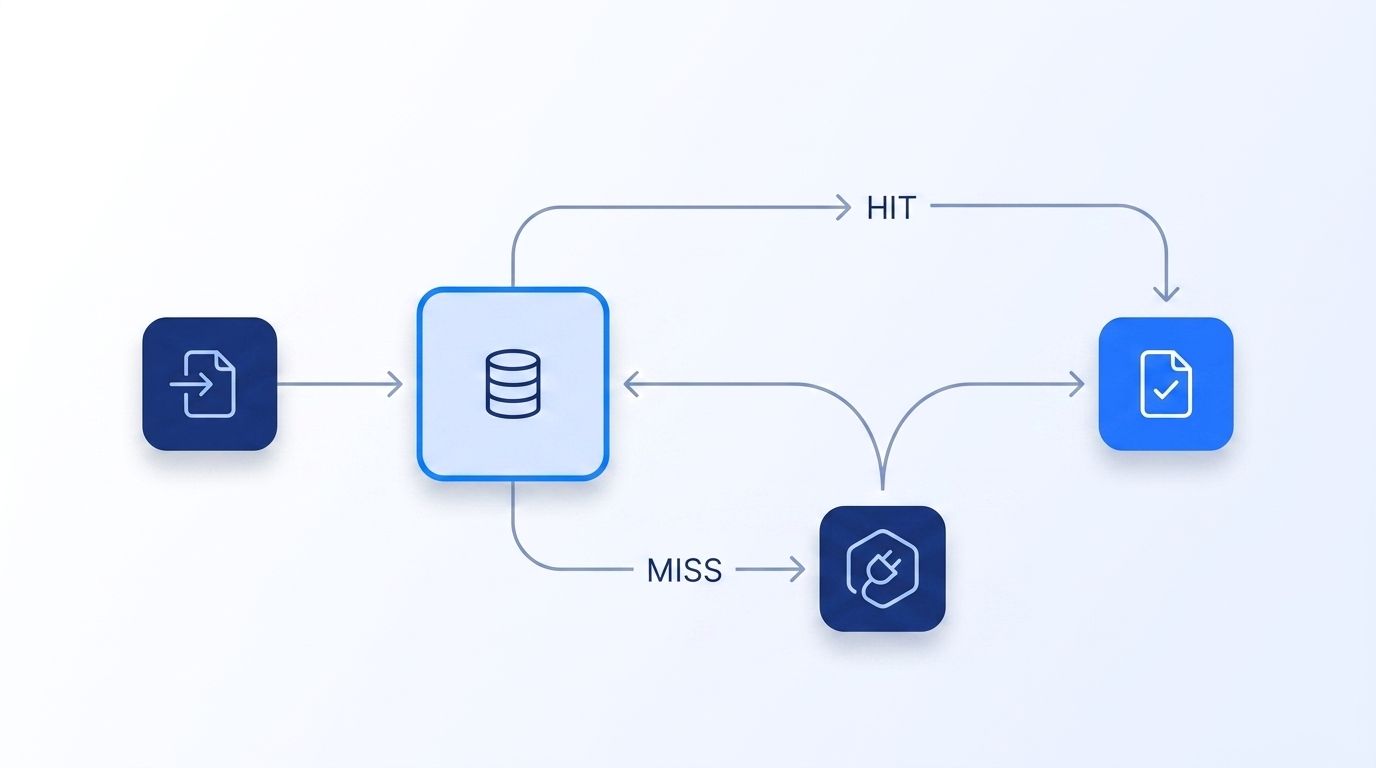
The key you cache on matters as much as the pattern. Key each entry by a stable identifier (LinkedIn profile URL or company domain) plus the specific field group, not just the record ID — that's what lets you apply different TTLs to different fields on the same person without re-fetching everything when only one field expires.
Citation-worthy summary: A cache-aside layer checks stored data before calling an enrichment API, serving fresh-enough responses for free and reserving paid calls for genuine misses. Combined with per-field TTLs, this pattern is the mechanism that turns "re-enrich on every touch" into "re-enrich only when the data plausibly changed."
People Profile endpoint Company Profile endpoint
How Do You Invalidate Stale Cache Entries?
Invalidate on a real-world signal whenever one is available, and fall back to the TTL only when no event tells you a field actually changed. A fixed 60-day timer is a reasonable default, but a job-change event, a funding announcement, or a hiring surge is a far better trigger — it tells you the moment a field is actually stale instead of guessing on a schedule.
Datamagnet's signal endpoints push job-change, company-engagement, and hiring events to a webhook as they happen, which you can use to expire the relevant cache entry the instant a real change occurs instead of waiting out the TTL. That collapses the gap between "the data changed" and "the cache knows it changed" from weeks down to minutes.
Create Signal endpoint Webhooks reference
Two invalidation rules keep this from getting brittle:
- Never invalidate the whole record on a single-field signal. A job-change event should expire the title, seniority, and company fields — not the phone number or firmographic data that had nothing to do with the event.
- Treat a cache miss on write as normal, not an error. If a webhook fires for a record you haven't cached yet, that's just a first-touch enrichment, not a failure of the cache logic.
How Much Can You Actually Save?
You can estimate savings before you build anything by modeling your own touch frequency against the decay rates for the fields you actually query. In 2026, Redis reported that semantic caching for repeated lookups can cut costs by up to 90%, and one case study saw a 70% cache hit rate translate directly into 70% cost savings (Redis, Prompt Caching vs. Semantic Caching, 2026) — a different workload than enrichment APIs, but the mechanism (avoid re-paying for an unchanged answer) is identical.
<!-- [ORIGINAL DATA] -->Here's a worked model built from verified inputs rather than a borrowed industry stat. Take a database of 10,000 contacts touched five times a quarter without caching — that's 50,000 enrichment calls. With a field-level cache and the TTLs above, only records whose cached fields have actually expired trigger a real API call. At a blended decay rate across job title, email, and phone (roughly 25-30% annually, or 6-8% per quarter for cache-relevant fields), you'd expect somewhere between 3,000 and 4,000 legitimate refresh calls on top of the initial 10,000 first-touch enrichments — around 13,000-14,000 total calls against the original 50,000. That's a 72-74% reduction in this specific model; more conservative assumptions about touch frequency and field mix bring the realistic range down to roughly 55-65% for most teams.
Doesn't that range feel too wide to plan a budget around? It's wide because touch frequency and field mix vary by team — a pipeline that only enriches on first capture will save less than one that re-queries on every campaign. Run the model with your own touch count and field decay rates before committing to a specific savings target.
What Does a Minimal Implementation Look Like?
A minimal implementation needs four pieces: a key-value store, a TTL table by field, a cache-aside wrapper around your enrichment calls, and a signal-based invalidation hook — in that build order, because each layer depends on the one before it working correctly.
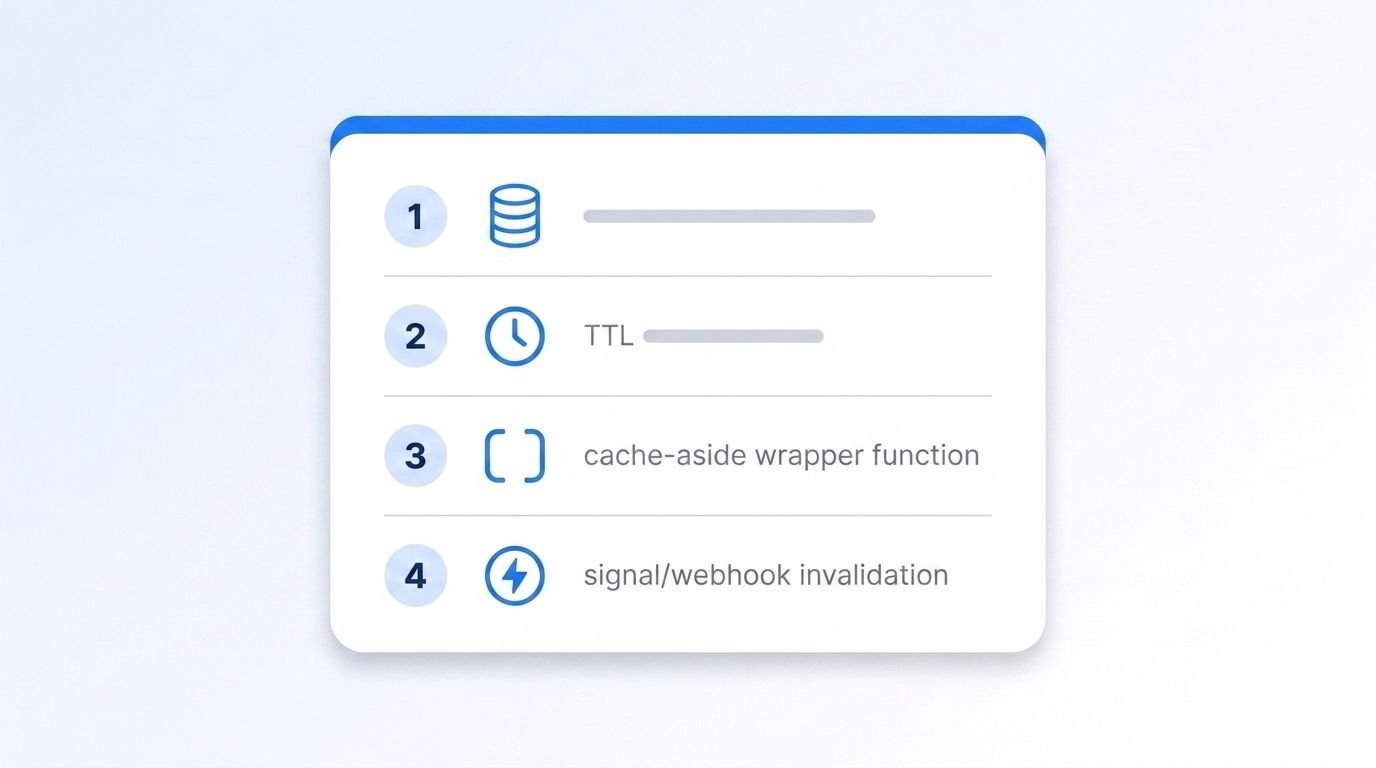
Step 1: Stand up a key-value store. Redis is the standard choice for this pattern because in-memory reads are typically 10-100x faster than a disk-backed database (Redis, Cache Optimization Strategies, 2026). Key entries by a stable identifier — LinkedIn profile URL for people, domain for companies — plus a field-group suffix.
Step 2: Define your TTL table. Start from the field-level table above and adjust once you have real bounce and staleness data from your own database. Store the TTL as metadata alongside the cached value, not just in application code, so you can tune it without a redeploy.
Step 3: Wrap every enrichment call in cache-aside logic. Check the store first. On a hit within TTL, return it. On a miss or expiry, call the enrichment API — the Authentication reference covers bearer-token setup for that call — and write the fresh result back with a new TTL timestamp.
Step 4: Wire signal-based invalidation for high-value fields. Subscribe to job-change and company-engagement webhooks for the fields most sensitive to real-world events, and expire just those fields the moment a signal fires, rather than waiting for a scheduled TTL to catch up.
Step 5: Log hits, misses, and invalidations separately. You need this to know whether your TTL table is actually working — a hit rate that's too low means your TTLs are too short; a rising bounce rate on emails served from cache means they're too long.
For teams already running enrichment through a CRM sync, our guide on programmatic CRM enrichment benefits covers where a cache layer fits alongside a webhook-driven sync pattern.
Frequently Asked Questions
What's the difference between an enrichment cache and just storing enriched fields in the CRM?
A CRM field stores a value with no expiration logic — nothing tracks whether it's still trustworthy. A cache layer adds a TTL and a last-verified timestamp per field, so your pipeline knows when to trust the stored value versus when to pay for a fresh lookup. That distinction is what actually prevents redundant API calls.
How long should I cache enrichment data for?
It depends on the field: firmographic data like industry or headcount can hold for 90-120 days, while email addresses decay faster, around 43% a year (ZoomInfo, What Is Data Decay?, 2026), and should expire closer to 30-45 days. Set TTLs per field group, not per record.
Will caching hurt data freshness for time-sensitive use cases like outbound sequencing?
Not if you pair TTLs with signal-based invalidation. A fixed TTL alone can miss a real change mid-window, but expiring the relevant field the moment a job-change or engagement webhook fires closes that gap without giving up the cost savings on records that haven't changed.
Does an enrichment cache work with a waterfall enrichment setup across multiple vendors?
Yes, and it arguably matters more there. A waterfall queries several vendors in sequence until a field is filled, and without a cache, every fallback query risks re-paying multiple vendors for a field you already resolved on a previous pass. Cache the resolved value regardless of which vendor filled it.
What's a realistic API cost reduction from adding a cache layer?
Most teams should expect somewhere in the 55-70% range, depending on touch frequency and field mix, based on a worked model comparing redundant multi-touch enrichment against field-level cached lookups. Teams with high touch frequency per record (multiple campaigns, frequent CRM syncs) see savings toward the higher end of that range.
Real-Time B2B People Enrichment API
Building the Cache Is the Cheap Part
The engineering behind a cache-aside layer is well-understood; the work that actually saves money is mapping decay rates to TTLs field by field and wiring invalidation to real signals instead of a fixed clock. Skip either step and you're either serving stale data or still paying for lookups you didn't need.
- Set TTLs per field, not per record — email, phone, and title decay at different rates
- Use cache-aside: check first, call the API only on a real miss or expiry
- Invalidate high-value fields on signal events, not just on a schedule
- Model your own savings from touch frequency and field mix before setting a budget target
Sources
- HubSpot / MarketingSherpa, Database Decay Simulation, retrieved 2026-07-21, https://www.hubspot.com/database-decay
- ZoomInfo Pipeline, What Is Data Decay? Maintaining Your B2B Database, retrieved 2026-07-21, https://pipeline.zoominfo.com/marketing/b2b-data-decay
- Redis, Cache Optimization: Strategies to Cut Latency and Cloud Cost, retrieved 2026-07-21, https://redis.io/blog/guide-to-cache-optimization-strategies/
- Redis, Prompt Caching vs. Semantic Caching: How to Make AI Agents Faster, retrieved 2026-07-21, https://redis.io/blog/prompt-caching-vs-semantic-caching/
- Apollo.io, API Pricing and Credits, retrieved 2026-07-21, https://docs.apollo.io/docs/api-pricing
- Datamagnet, Changelog: July 2026, retrieved 2026-07-21, https://docs.datamagnet.co/changelog/july-2026
- Datamagnet, Webhooks, retrieved 2026-07-21, https://docs.datamagnet.co/api-reference/webhooks
